SNMPのMIB定義ファイル群を解析・格納して、そこから情報を取り出したり、SNMPwalkでネットワークデバイスからOIDと値を収集してMIB定義情報と照合表示したりするOSSツール「Miburi」を作成・公開した。
Linux(amd64/arm64)・macOS(amd64/arm64)・Windows(amd64)向けにそれぞれバイナリをリリースしている。

使い方はREADMEに記載しているが、以下のコマンドを提供する。
miburi dump: MIB定義ファイルを集約してDB化するmiburi find: OIDを指定してDBから情報を探すmiburi walk: SNMPwalkを実行し、OIDに合致するDB情報と合わせて表示するmiburi json: DBの内容をJSON形式で出力するfindの例。
$ miburi find -t .1.3.6.1.2.1.1.4.0 -t iso.3.6.1.2.1.2.2.1.10.2 -v
OID: .1.3.6.1.2.1.1.4.0
Name: sysContact.0
MIB: SNMPv2-MIB
Type: DisplayString
Description: ---
The textual identification of the contact person for
this managed node, together with information on how
to contact this person.  If no contact information is
known, the value is the zero-length string.
---
OID: iso.3.6.1.2.1.2.2.1.10.2
Name: ifInOctets.2
MIB: RFC1213-MIB
Type: Counter32
Description: ---
The total number of octets received on the
interface, including framing characters.
---
walkの例。以下ではDebianのSNMPデーモンに問い合わせていて、かつ先頭部分を出しているだけなのでネットワーク機器っぽくない結果だけど。
$ miburi walk -H localhost -c public --target .1.3.6.1 -v
OID: .1.3.6.1.2.1.1.1.0
Name: sysDescr.0
MIB: SNMPv2-MIB
Type: OctetString
Value: Linux ...

OID: .1.3.6.1.2.1.1.2.0
Name: sysObjectID.0
MIB: SNMPv2-MIB
Type: ObjectIdentifier
Value: .1.3.6.1.4.1.8072.3.2.10

OID: .1.3.6.1.2.1.1.3.0
Name: sysUpTimeInstance
MIB: DISMAN-EXPRESSION-MIB
Type: TimeTicks
Value: 1483518
  ...
$ miburi walk -H localhost -c public --target .1.3.6.1 -v -j | jq
[
  {
    "OID": ".1.3.6.1.2.1.1.1.0",
    "Name": "sysDescr.0",
    "MIB": "SNMPv2-MIB",
    "Type": "OctetString",
    "Value": "Linux ...",
    "Enum": "",
    "Unit": "",
    "Desc": ""
  },
  {
    "OID": ".1.3.6.1.2.1.1.2.0",
  ...
$ miburi walk -H localhost -c public --target .1.3.6.1 -v -C > localhost.csv
$ cat localhost.csv
OID,Name,MIB,Type,Value,Enum,Unit,Desc
.1.3.6.1.2.1.1.1.0,sysDescr.0,SNMPv2-MIB,OctetString,Linux ...
64 #1 SMP PREEMPT_DYNAMIC Debian 6...
.1.3.6.1.2.1.1.2.0,sysObjectID.0,SNMPv2-MIB,ObjectIdentifier,.1.3.6.1.4.1.8072.3.2.10,,,
.1.3.6.1.2.1.1.3.0,sysUpTimeInstance,DISMAN-EXPRESSION-MIB,TimeTicks,1504062,,,
  ...
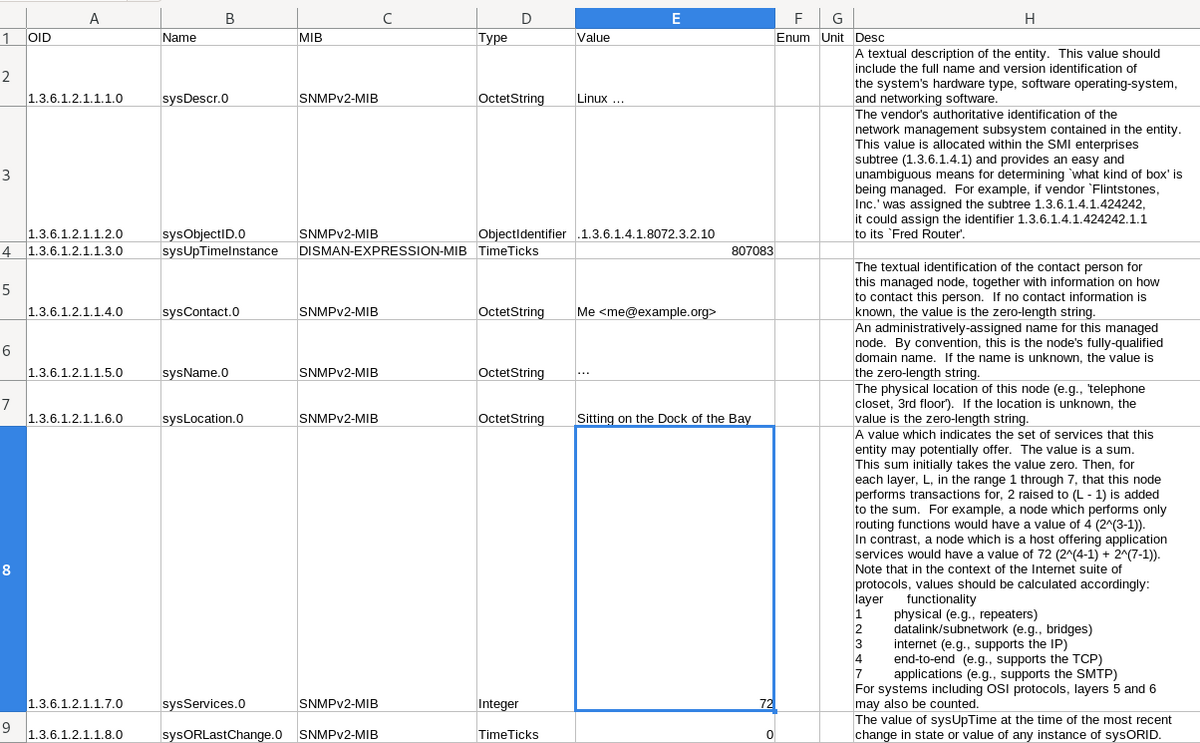
CSVファイルをスプレッドシートで開いた例。便利そうな気がしてくる?
業務用レベルの高級めなスイッチやルータなどのネットワークデバイスには、SNMPというプロトコルで機器情報(ポートの帯域やエラー率、CPUやファンの状態など)を提供する機能がたいてい備わっている。
SNMPの機器情報(MIB)の各要素はツリー状に形成され、ツリーの特定の場所はOIDというIDで表す。たとえばニーモニック表記で「iso.org.dod.internet.mgmt.mib-2.interfaces.ifTable.ifEntry.ifInOctets.2」、数で「.1.3.6.1.2.1.2.2.1.10.2」のOIDは、2番目のインターフェイスでの受信オクテットを表す。

標準MIBの範囲ではどのOIDにどういう種類の値(たとえばインターフェイスの受信オクテット)を持たせるかが来まっており、どの機器でも同じOIDで目的の情報を取得できる。このほかにCiscoやYAMAHAなどベンダーが固有に定めた拡張MIBもある。
どのOIDがどういうものを表すか、ニーモニックは何になるか、どのような値を取り得るか、といった人間向けの情報は、機器内ではなくMIB定義と呼ばれるテキストデータにまとめられて、IETFやベンダーなどから提供されている。ASN.1というテキスト形式で書かれているのだが、正直これを見てすぐに解釈できる人はそう多くないだろう……。
前置きが長くなったが、Mackerelではmackerel-plugin-snmpというプラグインで、SNMPで取得した値をグラフ化できる。当然これを皆さん使いたいわけだが、機器側MIBのどのOIDを使えばよいのかを知る必要がある(プラグインではニーモニックは利用できず、数のみ)。
LinuxほかUnix系ではsnmpwalkというコマンドで、機器のMIB、具体的にはOIDと値のセットを取得できるものの、それがどのような意味を持つのかはMIB定義のニーモニック程度での推測しかできない。MIB定義に含まれている説明などの詳細を見るには、別途MIBブラウザが必要となる。
そしてOSSのMIBブラウザは少ない。どのくらい少ないかというと、Debian bookwormで apt search mib browser をかけた結果が「tkmib」しか出てこない。厳しい。tkmibでも一応役立つ(walkも呼び出せる)のだが、正直使いやすいとは言えない。
Windowsになるとこの状況はさらに困難で、OSSのnet-snmpツールはSourceForgeにある古いバイナリしかなく(SourceForgeは前科がね……)、あとは何らかの有償ツールか、ソースコードなしのバイナリを信用して使うほかない。
Linux・macOS・Windowsでコードの変更なく、また言語実行環境などの特別なインストール不要で動作すること、MIB定義を解析できること、SNMPwalk相当ができること、結果に説明などを添えられること、JSONやCSVでも出力できること、と機能要件を立てて、Goで新たに実装してみることにした。
まだ全然Go慣れしておらず、手習いモードから抜け出せていない。今回はVisual Studio Code+CoPilot(GitHubのOSS開発者付与)の環境で、ChatGPTに都度聞きながら書き進め、週末の2日間でほぼ完成した。
SNMPとMIB定義を扱う手法については、sabatrapdの共同開発の際に実装コードを眺めていた経験が役立った。しかしSNMPはまだ感覚的に理解できるが、ASN.1 MIB定義はさっぱりわからないな……。sleepinggenius2/gosmiのコードを見ても理解できる気がしない。
SNMPのType処理をひたすら書き出すといった手作業だとかなり面倒そうなところが、CoPilotで次々補完されるのは体験として良い。ChatGPTにはOctetStringがUTF-8処理できなかったときのhex出力を質問したら良い形を提案してくれたのも良かった。
goreleaserの使い方はすっかり忘却しており、sabanoteなど以前に作ったものを見て脳に再インストールした。
gosnmp、gosmiのありがたさはもちろんだが、JSONでもCSVでもお手のものというGoのencodingライブラリはつくづく強いなと改めて感じた。これだけで他の言語で面倒になることの大半は考えなくてよくなる。
gosmiでのMIB定義解析はそれなりに時間がかかるため、解析して結果を保存する(dump)のと、それを使う(findやwalk)のは分離することにしている。スケールの必要性がないオブジェクトはシンプルに保持する設計が好きなんだけど(RubyだとPStore好き)、今回GOBを状態保存に使ってみて、とてもポジティブな印象を受けた。GOBはアーキテクチャ非依存なようなので、Linux上で保存したものをWindowsにデプロイして使う、ということもできる。
ロゴアイコンはいつものようにStable-Diffusion WebUI。Debian環境をインストールし直したこともあり、DockerでNVIDIAドライバ動かすのどうやるんだっけ…など変なところでつまづいていたりした(どうやらDocker Desktopではnvidia-container-toolkitは使えないっぽく、普通のDockerに入れ替えた)。むしろ作業時間のほとんどはGoの開発よりこっちの設定やアイコンの候補探しだったのでは?という気がしなくもない。
いかにもな隙間家具ツールではあるけれども、けっこう便利なものができた気はするし、手習いとして良い体験であった。おしまい
はてなブログだとどうやるんだろうな、と思ったけど Embed Blueskyからコードスニペット書き出して貼り付けるだけでよかった
